

Conversion instructions below
Go Ad-Free with ezyZip Pro!
No ads. No file size limits. ezyZip Pro includes downloadable desktop apps for archives, media, and images.
Video tutorial
Watch a 60-second walkthrough
Video tutorial showing how to convert documents online. This example shows docx to html conversion but same steps apply for mediawiki files.
How to convert MEDIAWIKI to MARKDOWN file?
Here are the steps to convert MEDIAWIKI to MARKDOWN using ezyZip.
- Select files to convert To select the MEDIAWIKI file, you have two options:
- Click "Select MEDIAWIKI file to convert" to open the file chooser
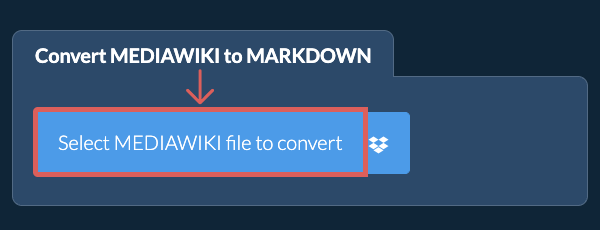
- Drag and drop the MEDIAWIKI file directly onto ezyZip
Click "Select MEDIAWIKI file to convert" to open the file chooser - Convert your fileClick "Convert to MARKDOWN". It will start the conversion process which will take some time to complete.
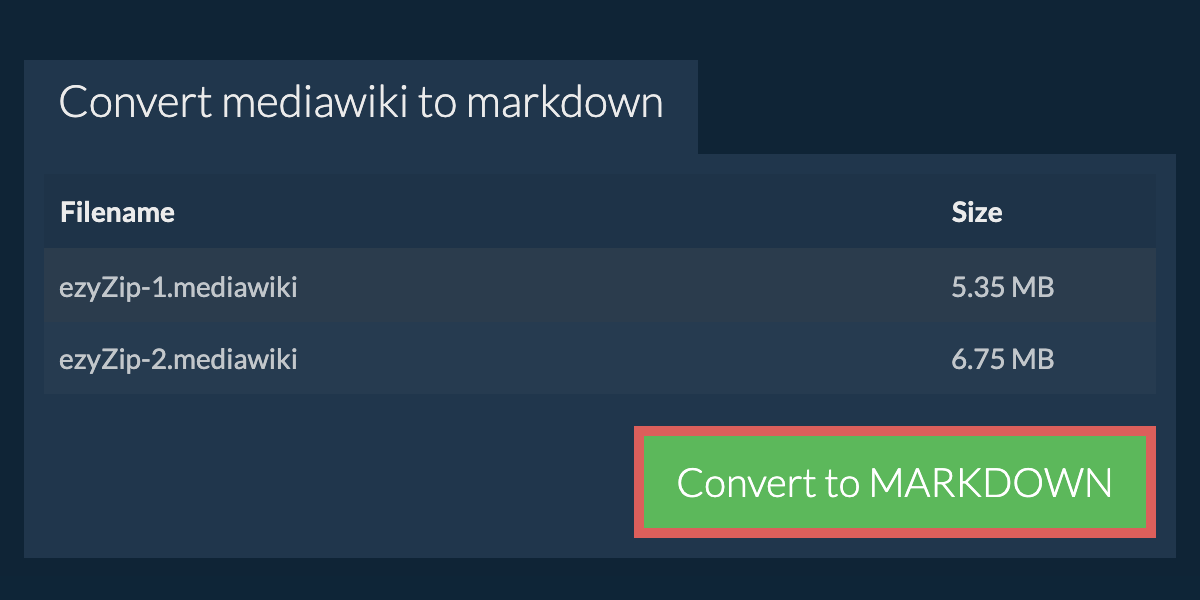
- Save the converted fileOnce all MEDIAWIKI files have been converted, you will be presented with the converted MARKDOWN files. Click on "Save" to save the converted files to your computer. For some file types, you can also click on "Preview" to view the converted document in your browser before saving.
More how-to guides
- Click the Dropbox iconClick on the Dropbox logo () in the MEDIAWIKI file selector button.
- Authorise and pick filesThe Dropbox file chooser will appear. You will need to authorise access to ezyZip the first time.
- Files appear in the listingOnce you have selected the MEDIAWIKI file, it will download it to your browser and initiate the conversion.
- Save back to DropboxTo save the converted MEDIAWIKI file to Dropbox, click on "Dropbox" dropdown under the "Save MEDIAWIKI File" button. This will require authorisation the first time you run it.
The file will be stored in /Apps/ezyZip folder.
Frequently asked questions
ezyZip is an online tool that supports any OS that can run a modern browser. We have tested it to work with Windows, MacOS, Linux (e.g. Ubuntu, Mint, Debian), Android, ChromeOS (Chromebook), iOS (iPhone, iPad & iPod Touch).
We are continuously updating the system, so ensure you are using the latest version of one of the popular browsers or their variants. (e.g. Chrome, Firefox, Safari, Opera).
Please let us know via the feedback form if you have any issues.
We are continuously updating the system, so ensure you are using the latest version of one of the popular browsers or their variants. (e.g. Chrome, Firefox, Safari, Opera).
Please let us know via the feedback form if you have any issues.
Yes. ezyZip utilises the processing power of your own computer and browser to complete the task. No file data leaves your browser. Unsure? Turn off your WiFi when completing the uncompression. It will continue to work as no data is uploaded to the internet.
ezyZip is a free online MEDIAWIKI to MARKDOWN converter that runs in your browser. No need to install any additional converter software. It supports a myriad of other media conversions too.
Unlike other online media conversion utilities, ezyZip does not add watermarks or require uploading files to a server. Use it as many times as you want, completely free. It runs locally as a browser app, making it much quicker than other online conversion tools. This also ensures your privacy will be protected as no file data will leave your browser.