

Conversion instructions below
Go Ad-Free with ezyZip Pro!
Convert between 250+ archive formats with no file size limits and no ads. ezyZip Pro includes a downloadable Archive Converter app for offline use.
Watch a 60-second walkthrough
How to convert VDI to QCOW2 file?
Here are the steps to convert VDI to QCOW2 archive using ezyZip.
- Select files to convert To select the VDI file, you have two options:
- Click "Select VDI file to convert" to open the file chooser
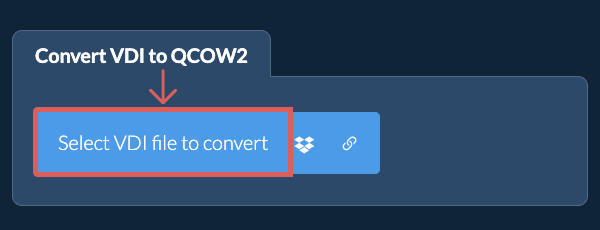
- Drag and drop the VDI file directly onto ezyZip
Click "Select VDI file to convert" to open the file chooser
- Convert your fileClick "Convert to QCOW2". It will start the conversion process which will take some time to complete.
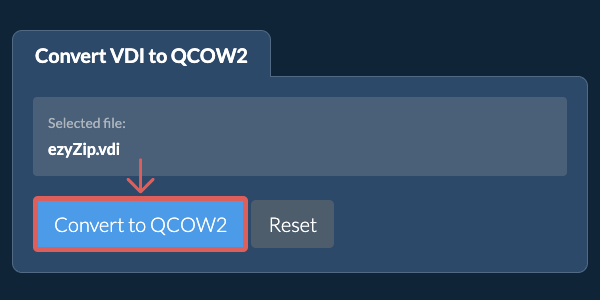
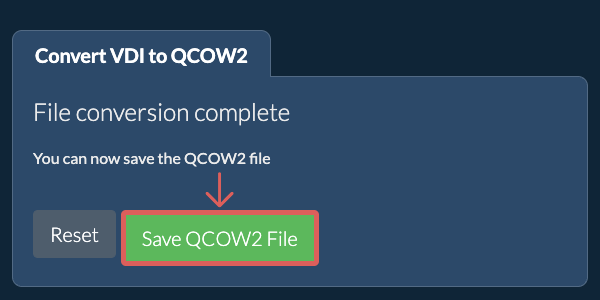
- Save the converted fileClick on "Save QCOW2 File" to save the converted QCOW2 file to your selected destination folder.
- Click the Dropbox iconClick on the Dropbox logo () in the VDI file selector button.
- Authorise and pick filesThe Dropbox file chooser will appear. You will need to authorise access to ezyZip the first time.
- Files appear in the listingOnce you have selected the VDI file, it will download it to your browser and initiate the conversion.
- Save back to DropboxTo save the converted QCOW2 file to Dropbox, click on "Dropbox" dropdown under the "Save QCOW2 File" button. This will require authorisation the first time you run it.
The file will be stored in /Apps/ezyZip folder.
Frequently asked questions
We are continuously updating the system, so ensure you are using the latest version of one of the popular browsers or their variants. (e.g. Chrome, Firefox, Safari, Opera).
Please let us know via the feedback form if you have any issues.
ezyZip is a free online VDI to QCOW2 converter that runs in your browser. No need to install any additional converter software. It supports a myriad of other file conversion options too.
Unlike other online archive conversion utilities, ezyZip does not require uploading files to a server. Use it as many times as you want, completely free. It runs locally as a browser app, thus making it much quicker than other online conversion tools. This also ensures your privacy will be protected as no file data will leave your browser.
This tool can extract files from VDI disk images, making VM data accessible without VirtualBox.
Note: When extracting files from a VDI image, the extracted content is often much smaller than the original file size. This is because VDI files use dynamic allocation. The disk image reserves space for the entire virtual hard drive, but most of it is typically empty (zero-filled). Only the actual data (operating system, applications, and user files) is extracted. The remaining space consists of unused reserved blocks, disk metadata, and space from files that were deleted inside the virtual machine but never reclaimed by the disk image.
Extract QCOW2 images to access virtual machine data without QEMU.
ezyZip processes files directly in your browser. Unlike most online tools, your files are not uploaded to our servers, which means faster processing and better privacy. Take a look at the feature comparison below and we think youll agree that ezyZip is the better choice for your file conversion needs.
| Feature | ezyZip | Other Online Tools |
|---|---|---|
| No Software Installation | Works Directly in Browser | Works Directly in Browser |
| Processing Location | Your Browser (No Upload) | Their Servers (Upload Required) |
| Privacy & Security | 100% Private (Files Never Leave Your Device) | Files Uploaded, Accessible by Others |
| Processing Speed | Fast (No Upload/Download Time) | Slow (Upload + Process + Download) |
| Registration Required | Never | Often Required for Large Files |
| Works Offline | Yes (After Page Load) | No |
| Supported Formats | 250+ Archive Formats | Limited Format Support |
| Cost | 100% Free | Free with Limitations / Paid Tiers |
| Established | Since 2009 (15+ Years) | Recent (May Disappear) |
Why client-side VDI to QCOW2 conversion is faster and more private
ezyZip converts VDI to QCOW2 entirely within your browser's WebAssembly runtime. Here is why local conversion outperforms server-based converters:
- Optimal Engine RoutingThe system automatically selects the best decompression and compression engine for each format combination. For large archives, streaming conversion stages data through the Origin Private File System to avoid memory exhaustion while maintaining throughput.
- No Double TransferServer-based converters require uploading the source archive and downloading the converted result — local processing eliminates this double-transfer overhead. For a 1 GB archive on a typical connection, this saves 30+ minutes of transfer time alone.
- Single-Pass TranscodingDecompression and re-encoding happen in a single pipeline within WASM, avoiding intermediate temporary files. The input format is decoded and the output format is encoded in one continuous pass, minimizing disk writes and processing time.