


Recovery instructions below
Go Ad-Free with ezyZip Pro!
Forgot a ZIP, RAR, 7-Zip, PDF, or Office password? ezyZip Pro includes a desktop Password Recovery app that works through millions of likely passwords, fully offline with optional GPU acceleration.
Watch a 60-second walkthrough
How do I recover a forgotten 7Z password?
- Select File To select the 7Z file, you have two options:
- Click "Select 7Z file to crack" to open the file chooser
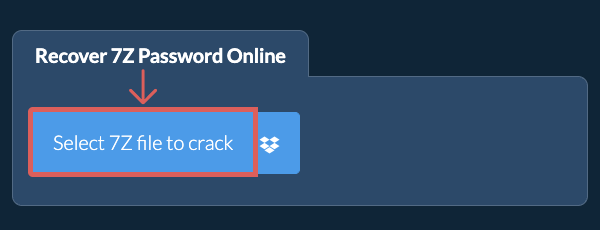
- Drag and drop the 7Z file directly onto ezyZip
Click "Select 7Z file to crack" to open the file chooser - Choose Wordlist (Optional)(Optional) Turn on "Use my own wordlist" and choose a plain text wordlist file (.txt, .lst or .dic). Otherwise the built in wordlist is used.
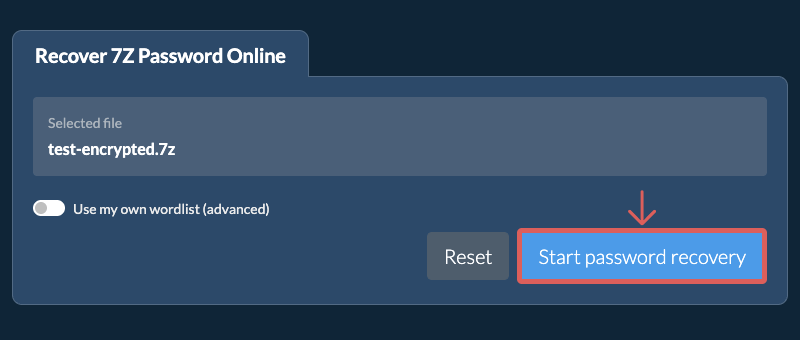
- Start RecoveryClick "Start password recovery". ezyZip tries each password from the wordlist in your browser. This can take a while, and it can only find a password that appears in the wordlist.
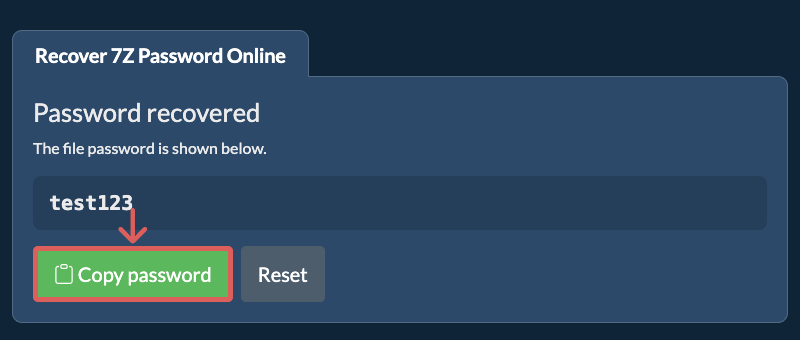
- Copy PasswordWhen a match is found, the recovered password is shown on screen. Click "Copy password" to copy it.
Frequently asked questions
We are continuously updating the system, so ensure you are using the latest version of one of the popular browsers or their variants. (e.g. Chrome, Firefox, Safari, Opera).
Please let us know via the feedback form if you have any issues.
ezyZip is a free online tool that can recover a forgotten password from an encrypted 7Z file by trying candidate passwords from a wordlist, one by one.
Unlike other online tools, ezyZip runs locally in your browser, so your file never leaves your device and your privacy is protected.
ezyZip processes files directly in your browser. Unlike most online tools, your files are not uploaded to our servers, which means faster processing and better privacy. Take a look at the feature comparison below and we think you'll agree that ezyZip is the better choice for your file conversion needs.
| Feature | ezyZip | Other Online Tools |
|---|---|---|
| No Software Installation | Works Directly in Browser | Works Directly in Browser |
| Processing Location | Your Browser (No Upload) | Their Servers (Upload Required) |
| Privacy & Security | 100% Private (Files Never Leave Your Device) | Files Uploaded, Accessible by Others |
| Processing Speed | Fast (No Upload/Download Time) | Slow (Upload + Process + Download) |
| Registration Required | Never | Often Required for Large Files |
| Works Offline | Yes (After Page Load) | No |
| Cost | 100% Free | Free with Limitations / Paid Tiers |
| Established | Since 2009 (15+ Years) | Recent (May Disappear) |