

Instructions below
Go Ad-Free with ezyZip Pro!
No ads. No file size limits. ezyZip Pro includes downloadable desktop apps for archives, media, and images.
Watch a 60-second walkthrough
How do I repair a corrupted RAR file and recover my files?
- Select File to Repair To select the RAR file, you have two options:
- Click "Select RAR file to repair" to open the file chooser
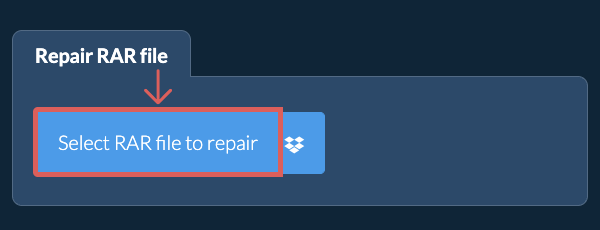
- Drag and drop the RAR file directly onto ezyZip
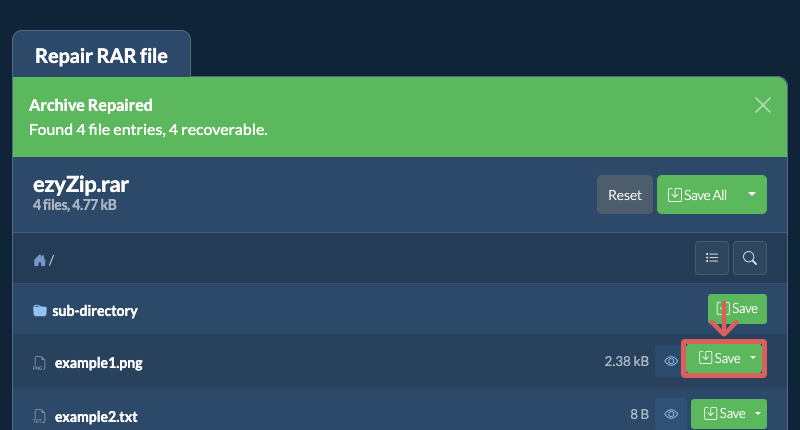
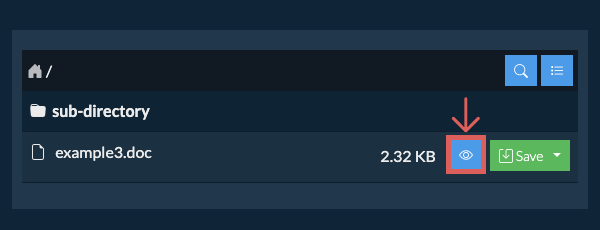
It will start the repair process and list the recovered files once complete. - Save Repaired FilesClick the green "Save" button on the individual files to save to your selected destination folder.
Frequently asked questions
We are continuously updating the system, so ensure you are using the latest version of one of the popular browsers or their variants. (e.g. Chrome, Firefox, Safari, Opera).
Please let us know via the feedback form if you have any issues.
ezyZip is a free online utility for repairing corrupted RAR files and recovering the data within them. Beyond repairs, ezyZip can also open, create, and convert a wide range of file formats including archives, images, audio, and video.
Unlike other online file repair utilities, ezyZip DOES NOT require you to upload or download files to a server. It runs locally as a browser app, thus making it much quicker than other online repair tools. This also helps protect your privacy, because your files are processed in your browser and are not uploaded.
You don't need to register or create an account, so you can start using it straight away.
ezyZip processes files directly in your browser. Unlike most online tools, your files are not uploaded to our servers, which means faster processing and better privacy. Take a look at the feature comparison below and we think you'll agree that ezyZip is the better choice for your file conversion needs.
| Feature | ezyZip | Other Online Tools |
|---|---|---|
| No Software Installation | Works Directly in Browser | Works Directly in Browser |
| Processing Location | Your Browser (No Upload) | Their Servers (Upload Required) |
| Privacy & Security | Files Stay on Your Device | Files Uploaded, Accessible by Others |
| Processing Speed | Fast (No Upload/Download Time) | Slow (Upload + Process + Download) |
| Registration Required | Never | Often Required for Large Files |
| Works Offline | Yes (After Page Load) | No |
| Cost | 100% Free | Free with Limitations / Paid Tiers |
| Established | Since 2009 (15+ Years) | Recent (May Disappear) |
Why client-side RAR archive repair is safer for damaged files
ezyZip repairs corrupted RAR archives using WebAssembly-based parsers running locally in your browser. Here is why local repair is safer for damaged files:
- Multi-Engine RecoveryMultiple extraction engines attempt recovery with automatic failover — if one engine cannot parse the damage, the system switches to an alternative decompressor. This cascading approach maximizes the chance of recovering data from archives with header corruption, truncated entries, or damaged compression streams.
- No Transfer CorruptionDamaged archives are read directly from your filesystem through the File API, avoiding network transfer errors that could compound existing corruption. Even a single bit flip during upload could make an already fragile archive completely unrecoverable.
- Partial Data PreservationLocal processing preserves partial data fragments that lossy network transfers to remote servers might discard. The repair engine scans byte-by-byte for valid file signatures, recovering individual entries even when the archive's central directory is destroyed.
- Local File Table ReconstructionWebAssembly parsers reconstruct damaged file tables in-browser, keeping all recovery attempts within your device. The reconstruction process builds a new directory index from scattered file headers found throughout the archive.
No. ezyZip is free to use without registering: there's no sign-up form, no account to create and nothing to log in to. Open any tool and start straight away.
If you load files from Dropbox, Google Drive or OneDrive, that service asks you to sign in to it, not to ezyZip. Only ezyZip Pro, the paid ad-free version, uses an account.