


Instructions below
Go Ad-Free with ezyZip Pro!
Convert and compress images across 200+ formats with no file size limits and no ads. ezyZip Pro includes a downloadable Image Converter app with advanced optimization.
Video tutorial
Watch a 60-second walkthrough
Video guide showing how to view ans files online.
How do I view ANS files online?
Quickly preview ANS images online by following the simple steps below.
- Select files to convertClick on "Select ANS files to view" to select the images you wish to open inside browser.

- Convert your fileClick on "View images" to convert images for viewing.
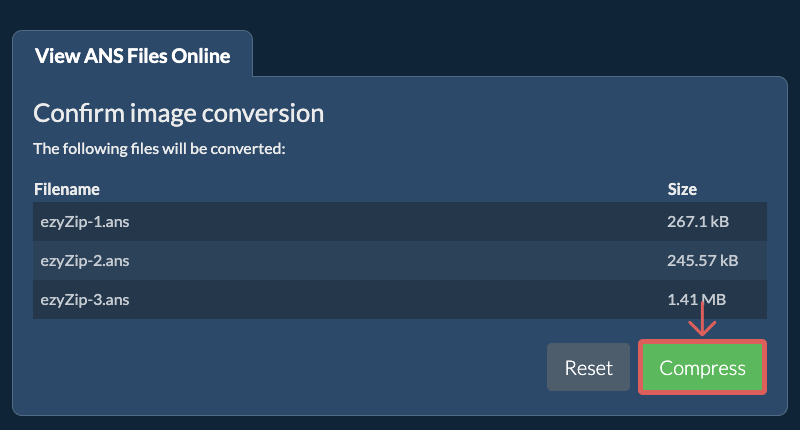
- Save the converted fileIt will list the PNG images once ready for viewing. Click on "Preview" to show the image in a new browser window. Click on "Save" the save the image to your computer as a high quality PNG file.

More how-to guides
- Select from DropboxClick the down arrow (▾) next to the ANS file selection button, then choose "Select from Dropbox".
- Pick your filesA small ezyZip window opens. Click "Continue to Dropbox", sign in to Dropbox if asked, then pick what you want to convert.
- Follow the instructionsezyZip downloads the ANS file(s) into your browser. Then follow the instructions above.
- Save to DropboxWhen your file is ready, click the down arrow (▾) next to the save button and choose "Dropbox". The first time, Dropbox asks you to allow ezyZip access.
Files are saved in the /Apps/ezyZip folder.
- Select from Google DriveClick the down arrow (▾) next to the ANS file selection button, then choose "Select from Google Drive".
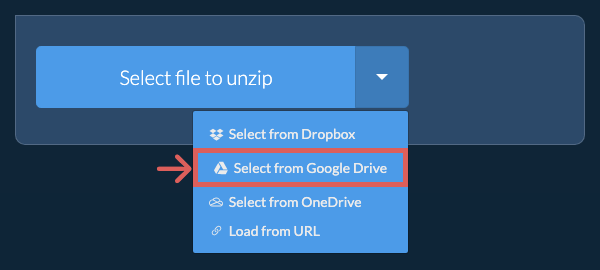
- Sign in and pick filesA Google Drive window opens. Sign in to Google if asked, allow ezyZip to access the files you choose, then pick what you want to convert.
- Follow the instructionsezyZip downloads the ANS file(s) into your browser. Then follow the instructions above.
- Save to Google DriveWhen your file is ready, click the down arrow (▾) next to the save button and choose "Google Drive". Sign in to Google if asked.
Files are saved in the My Drive/ezyZip folder.
- Select from OneDriveClick the down arrow (▾) next to the ANS file selection button, then choose "Select from OneDrive".
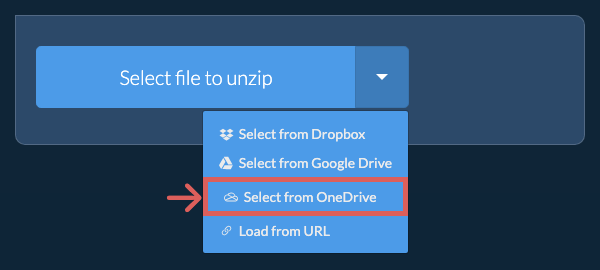
- Sign in and pick filesA OneDrive window opens. Sign in with your personal Microsoft account if asked and allow ezyZip access, then pick what you want to convert.
- Follow the instructionsezyZip downloads the ANS file(s) into your browser. Then follow the instructions above.
- Save to OneDriveWhen your file is ready, click the down arrow (▾) next to the save button and choose "OneDrive". Sign in with your Microsoft account if asked.
Files are saved in the Apps/ezyZip folder.
Frequently asked questions
It depends on the original image. If the original image is large and you are also trying to reduce file size significantly, then invariably the quality will suffer. If you reduce the resolution, then the quality will suffer less. You can use the preview functionality to check the quality of the image before saving it.
ezyZip is an online tool that supports any OS that can run a modern browser. We have tested it to work with Windows, MacOS, Linux (e.g. Ubuntu, Mint, Debian), Android, ChromeOS (Chromebook), iOS (iPhone, iPad & iPod Touch).
We are continuously updating the system, so ensure you are using the latest version of one of the popular browsers or their variants. (e.g. Chrome, Firefox, Safari, Opera).
Please let us know via the feedback form if you have any issues.
We are continuously updating the system, so ensure you are using the latest version of one of the popular browsers or their variants. (e.g. Chrome, Firefox, Safari, Opera).
Please let us know via the feedback form if you have any issues.
ezyZip provides tools for managing different file types. This specific utility allows for online viewing of ANS files, with an option to download the images as high-quality PNG files to your computer.
ANS files hold ANSI art: pictures made of text characters from the DOS character set (code page 437), colored with ANSI escape codes. ANSI art was popular on bulletin board systems (BBSes) in the late 1980s and early 1990s, when art groups such as ACiD (founded in 1990) and iCE (founded in 1991) were active. Many files end with a SAUCE record that stores the title, artist and group.
Some groups gave their files their own extension, so ANSI art also turns up as .ice (iCE) and .drk (Dark). .gbs files were ANSI screens for the Opus-CBCS BBS software, and .ansi and .m15 files are also found. Large collections of this art are kept at 16colo.rs.
This tool renders ANSI art as a PNG, JPEG or PDF image in your browser. It produces a picture, not text, and does not change the text encoding of a file.
Some groups gave their files their own extension, so ANSI art also turns up as .ice (iCE) and .drk (Dark). .gbs files were ANSI screens for the Opus-CBCS BBS software, and .ansi and .m15 files are also found. Large collections of this art are kept at 16colo.rs.
This tool renders ANSI art as a PNG, JPEG or PDF image in your browser. It produces a picture, not text, and does not change the text encoding of a file.
ezyZip processes files directly in your browser. Unlike most online tools, your files are not uploaded to our servers, which means faster processing and better privacy. Take a look at the feature comparison below and we think you'll agree that ezyZip is the better choice for your file conversion needs.
| Feature | ezyZip | Other Online Tools |
|---|---|---|
| No Software Installation | Works Directly in Browser | Works Directly in Browser |
| Processing Location | Your Browser (No Upload) | Their Servers (Upload Required) |
| Privacy & Security | Files Stay on Your Device | Files Uploaded, Accessible by Others |
| Processing Speed | Fast (No Upload/Download Time) | Slow (Upload + Process + Download) |
| Registration Required | Never | Often Required for Large Files |
| Works Offline | Yes (After Page Load) | No |
| Image Format Support | 90+ Image Formats | Limited (JPEG, PNG, GIF only) |
| Compression Quality | Smart Quality Optimization | Basic Compression |
| Batch Processing | Process Multiple Images | One at a Time |
| Cost | 100% Free | Free with Limitations / Paid Tiers |
| Established | Since 2009 (15+ Years) | Recent (May Disappear) |
Why client-side ANS image viewing is faster and more private
ezyZip decodes ANS images directly from your filesystem without any server upload. Here is why local image viewing is superior:
- 90+ Format SupportThe WebAssembly decoder handles over 90 image formats that browsers cannot natively render, including RAW camera formats, scientific imaging formats, and legacy formats from older software. If your browser shows a blank file, ezyZip can likely decode it.
- Instant Canvas RenderingDecoded pixel data is displayed through the Canvas API for immediate viewport rendering, with no server round-trip delay. High-resolution images are decoded progressively, so you see the image building up in real time rather than waiting for a complete decode.
- Full-Resolution PreviewView images at their native resolution with zoom and pan controls. Unlike server-based viewers that generate downscaled thumbnails, ezyZip decodes the full image locally so you see every pixel of detail.
- Network-Independent SpeedBecause the decoding pipeline is entirely local, image viewing is instantaneous regardless of your network connection speed. This is especially useful when reviewing large batches of high-resolution photos or camera RAW files.